Help & FAQ
Getting Started
- Install the app on your store from the Shopify App Store.
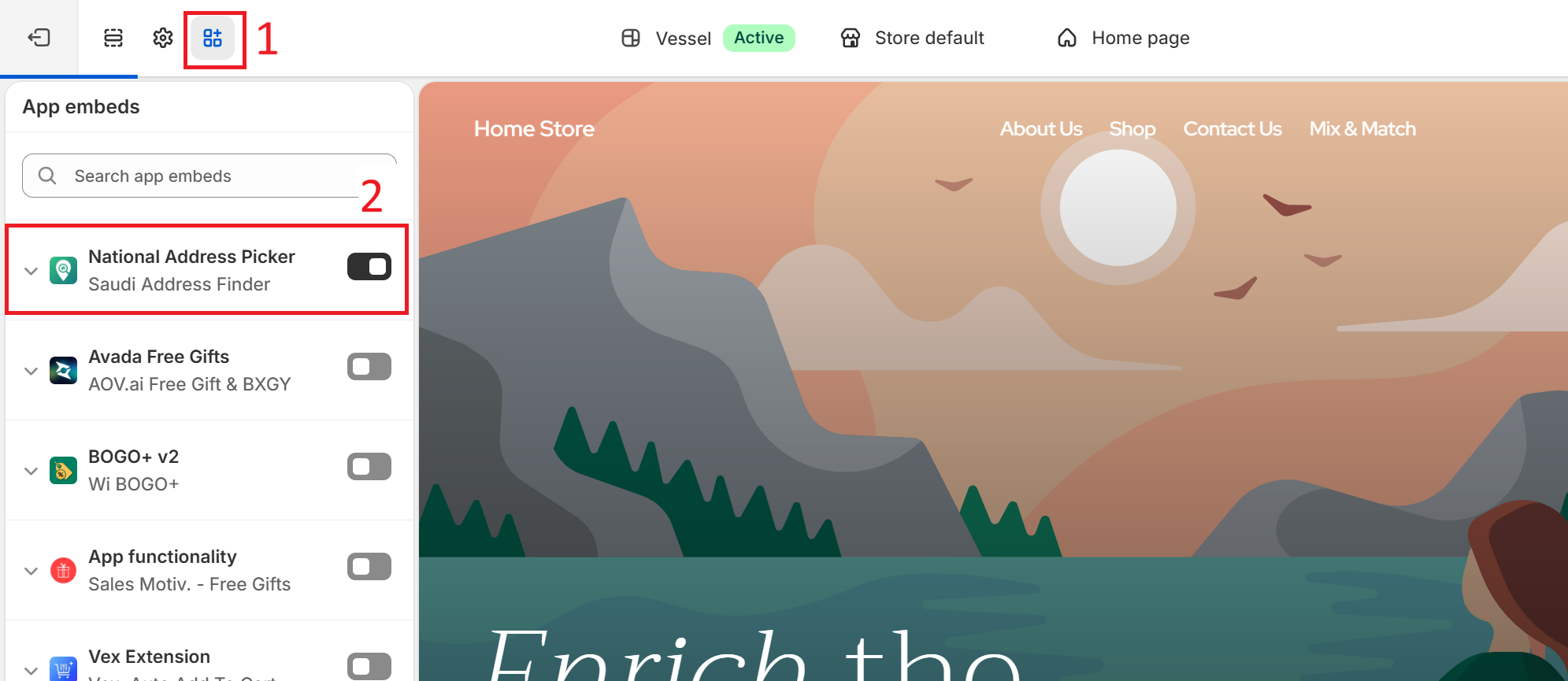
- Go to Sales channels → Online Store → Edit theme.
- Click the app embeds icon (top toolbar), find "National Address Picker" in the list, and turn it on.
- Click Save — the toggle alone doesn't apply until you save.
- In the app's admin, under Settings, confirm "Enable National Address widget on storefront" is turned on.
- Customers will now see a "Please Select Your Delivery Location" prompt in their cart. They drop a pin on the map, and the app resolves it into a National Address code automatically.
- In the app's dashboard, the Resolved orders table shows every order with a National Address found, and how it was found. The Unresolved orders table shows any orders that still need one, with quick links to follow up by email or WhatsApp.

FAQ
Does this cost anything?
- Free — 25 orders/month, 125 map views/month, no credit card required
- Growth ($12/mo) — unlimited orders, 500 map views/month
- Scale ($25/mo) — unlimited orders, 1,500 map views/month
Adding your own verified Google Maps key removes the map-view cap entirely, on any plan. Upgrade any time from the app's Plan & Usage section.
Do I need my own Google Maps key?
No — a shared key is used by default and just works. If you have your own Google Cloud project, you can add your own key in Settings to remove the monthly map-view cap. Our support team can help you with that.
Will it work with my theme?
Yes, as long as your theme supports Online Store 2.0 app embeds (most current Shopify themes do). The widget installs as a standard app block — no manual theme code editing required. If you run into any trouble, our support team can help.
What if a customer can't find their address?
Checkout is never blocked. If a customer doesn't complete the map step, the order still goes through, and the app automatically retries recovering the address afterward. If it still can't find one, the order shows up in the app's Unresolved orders table so you can follow up directly.
How do I get support?
Email support@saudiaddressfinder.com, or use the chat bubble on this site.